AI for B2B and explainer videos: the tools to use, from beginner to pro
Every business needs more video than it can afford to film. Here is how to use AI for explainers and B2B videos, from your first avatar video to studio-grade brand films, without making something that looks cheap.
Key points
- 98% of people have watched an explainer video to learn about a product, and 78% prefer to learn from a short video, per Wyzowl.
- Start with an avatar tool for training and internal videos. Plans begin at about $22 to $24 a month.
- Move to video models such as Veo, Kling, Runway and Seedance when you need scenes, not a talking head.
- OpenAI retired Sora in 2026. Do not build your whole workflow on one tool.
- Hire a studio when the video faces customers or investors, needs a consistent character, or must sound premium.
I get asked the same question by almost every founder and marketing head I meet: "Can't we just make our videos with AI now?"
The honest answer is yes, some of them. A product walkthrough for your sales team, an onboarding video for new joiners, a quick update for customers: AI tools can handle those today, often in an afternoon. But I have also seen companies spend weeks producing AI videos that look cheap, sound robotic and quietly make the brand feel smaller than it is.
So this is the guide I wish someone had given me. It goes level by level, from your first AI video to studio-grade work, and it ends with an honest view of when to do it yourself and when to bring in people like us.
First, why bother with explainers at all?
Because people genuinely prefer them. Wyzowl's long-running State of Video Marketing survey found that 98% of people have watched an explainer video to learn about a product or service. 78% said they would most like to learn about a product from a short video. And 73% of marketers said the most effective length is between 30 seconds and 2 minutes.
In other words, short, clear explainers are not a nice extra. They are how your buyers want to learn.
The best explainer I ever approved was ninety seconds long and answered exactly one question. Every time we tried to answer three, nobody remembered any of them.Prita Bali, Founder, FilmE Productions
Three kinds of business video, three different approaches
Before you open any tool, decide what you are actually making. It changes everything.
| Video type | Examples | Best approach |
|---|---|---|
| Presenter videos | Training, onboarding, internal updates, FAQs | Avatar tools with your script |
| Explainers | How a product works, a process, a service | Illustrated or cinematic scenes with a clear voice-over |
| Brand films | Launches, investor stories, customer stories | Cinematic AI scenes, original music, full sound design |
The further down that table you go, the more the result depends on craft and the less on the tool.
Level 1: your first AI video
Start small and start internal. A training module or a team update is the perfect place to learn, because a mistake costs nothing.
Avatar tools turn a script into a presenter speaking on screen. Synthesia and HeyGen are the best known. You type the script, pick an avatar and a voice, and the video appears. Many support Hindi and other Indian languages. Both can also create a custom avatar of a real team member, with that person's consent.
According to Arcade's 2026 pricing comparison, entry plans cost about $22 a month for Synthesia Starter and $24 a month for HeyGen Creator, with business and enterprise tiers above that.
Editing apps with built-in AI, such as CapCut, will add captions, cut out silences, resize for every social platform and suggest music. They are brilliant for chopping a long webinar into short clips.
Three habits make the biggest difference at this level:
- Write for the ear, not the eye. Short sentences, one idea each. Read it aloud before you generate anything.
- Keep it under two minutes. Then try to cut it to ninety seconds.
- Always add captions. Most people watch at their desk with the sound off.
Level 2: explainers that look designed
Explainers need visuals, not just a presenter. This is where most teams start combining tools:
- Image generation for scenes, illustrations and storyboards.
- Video generation to bring those images to life. Most current models animate a still into a clip of 5 to 15 seconds.
- Voice tools for narration in several languages. ElevenLabs is widely used for natural-sounding voices and dubbing.
Here is the mistake I see most often at this level: every scene is generated with a fresh prompt. The result looks like eight different videos glued together, each with its own colours, faces and lighting.
The fix is to decide the look first. Pick your colours, your characters, your lighting and your framing, then use reference images to keep every single scene consistent. It feels slower at the start. It saves you days at the end.
Level 3: how professionals actually work
Professional AI production looks less like one clever tool and more like a film pipeline. These are the leading video models in late 2026:
| Model | Made by | Best known for |
|---|---|---|
| Veo 3.1 | Realism, synced sound, native vertical video | |
| Kling 4.0 | Kuaishou | Longer multi-shot clips, up to about 30 seconds, and 4K |
| Runway Gen-4.5 and Aleph | Runway | Directing and editing control in one place |
| Seedance 2.5 | ByteDance | Long clips with sound |
| Gemini Omni | Google's newest family of video models |
Runway plans start at about $12 to $15 a month. Many models are also sold per second of output, from about $0.05 a second for Veo 3.1 Lite at 720p to over $1 a second for some models at 4K.
One cautionary tale: OpenAI retired Sora in 2026. The app closed in April and the API in September, with no direct replacement. Teams who had built everything around it had to start again. The professionals I know now build workflows that can switch models whenever a better one arrives.
Around the video model, a professional pipeline has:
- A human-written script and storyboard, sometimes drafted with a language model, always edited by a person.
- Look development that fixes characters, costumes, locations and colour before any video is generated.
- Voice recorded by actors or generated, then checked line by line.
- Music that is licensed or composed for the project.
- Editing and grading in tools such as DaVinci Resolve or Adobe Premiere Pro.
- Sound design and mixing, which most AI tools still handle poorly.
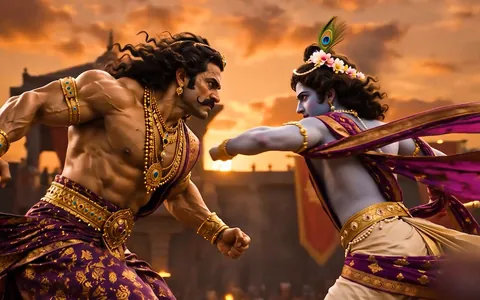
Vijay Subramaniam, whose team made JioHotstar's AI Mahabharat, described this kind of work better than I can:
It's not like you open your laptop, go to ChatGPT, and type, "Show me a blue Krishna with a wheel." That's not how it works.Vijay Subramaniam, Founder and Group CEO, Collective Artists Network, to The Hollywood Reporter India
Five things AI still gets wrong in business videos
I keep this list pinned for our own team, because each one has caught someone out.
- Your product. AI invents details. Your interface, packaging and logo must come from real assets, never generation.
- Text on screen. Generated video often garbles words. Add titles, labels and numbers in the edit.
- Hands and close-ups. Hands using phones or keyboards still often look wrong.
- Pronunciation. Brand names, acronyms and technical terms need checking in every language.
- Consistency across a series. Keeping one character the same across ten videos takes planning that most tools will not do for you.
AI will happily give your product a button it doesn't have. That's funny in a test. It's a support ticket when a customer sees it.Prita Bali, Founder, FilmE Productions
Doing it yourself versus hiring a studio
Honestly, a lot of business video should be made in-house now. Here is how I would decide.
| Do it in-house when | Bring in a studio when |
|---|---|
| It is internal or short-lived | It faces customers, investors or the press |
| You need volume and speed | You need a recurring brand character or series |
| A presenter format works | You need scenes, story and cinematic quality |
| Stock or simple music is fine | Sound matters: original score, mixing, voice performance |
| Any format will do | It must meet a broadcaster's or platform's specs |
Even Netflix, which used generative AI on about 300 titles this year, keeps saying the same thing. In its co-CEO Ted Sarandos's words, "it takes great artists to make something great, and AI is not changing that." The tool is never the whole answer.
How FilmE makes B2B and explainer films
FilmE Productions makes brand films, explainers and product stories for companies in India and abroad. Our writers turn your message into a script, our directors lock the look before anything is generated, and our sound designers give the film a premium finish.
We also make explainer series. Our reel on nine ways to meditate is a good example of how a calm voice and simple visuals can carry a how-to video that people actually finish.
We price AI production at ₹10,000 to ₹30,000 per finished minute, depending on complexity, languages and sound. If you are not sure whether your next video needs a studio or just a good tool and an afternoon, book a free consultation. I am always happy to tell you when it's the second.
Frequently asked questions
What is the best AI tool for explainer videos?
For talking-head explainers and training, avatar tools such as Synthesia and HeyGen are fastest. For cinematic explainers with scenes and characters, teams combine a video model such as Veo, Kling or Runway with a voice tool and a professional editor.
How much do AI video tools cost in 2026?
Avatar tools start at about $22 to $24 a month, and Runway at about $12 to $15. Video models are often priced per second of output, from about $0.05 to over $1 depending on model and resolution. Prices change often, so check vendor pages.
How long should a B2B explainer video be?
In Wyzowl's survey, 73% of marketers said videos between 30 seconds and 2 minutes are most effective. One idea per video works best.
Can AI make explainer videos in Hindi and other Indian languages?
Yes. Most avatar and voice tools support Hindi and several other Indian languages. Have a native speaker check every script and voice track, especially product names and technical terms.
When should a business hire an AI video studio?
When the video faces customers, investors or the press, needs a recurring brand character, needs original music and sound design, or must meet broadcast or platform specs.
Sources
- Wyzowl: State of Video Marketing 2025 (survey of 205 marketers and consumers, late 2024)
- Arcade: AI video pricing comparison 2026 (updated 4 Nov 2026)
- Shattered: Best AI video generators 2026
- Tech Insider: Best AI video generator 2026
- The Hollywood Reporter India: Vijay Subramaniam on AI Mahabharat
- IBC: Netflix uses GenAI on 300 titles in 2026